

BGP Control Plane Resources
Cilium BGP control plane is managed by a set of custom resources which provide a flexible way to configure BGP peers, policies, and advertisements.
The following resources are used to manage the BGP Control Plane:
CiliumBGPClusterConfig: Defines BGP instances and peer configurations that are applied to multiple nodes.CiliumBGPPeerConfig: A common set of BGP peering setting. It can be used across multiple peers.CiliumBGPAdvertisement: Defines prefixes that are injected into the BGP routing table.CiliumBGPNodeConfigOverride: Defines node-specific BGP configuration to provide a finer control.
The relationship between various resources is shown in the below diagram:
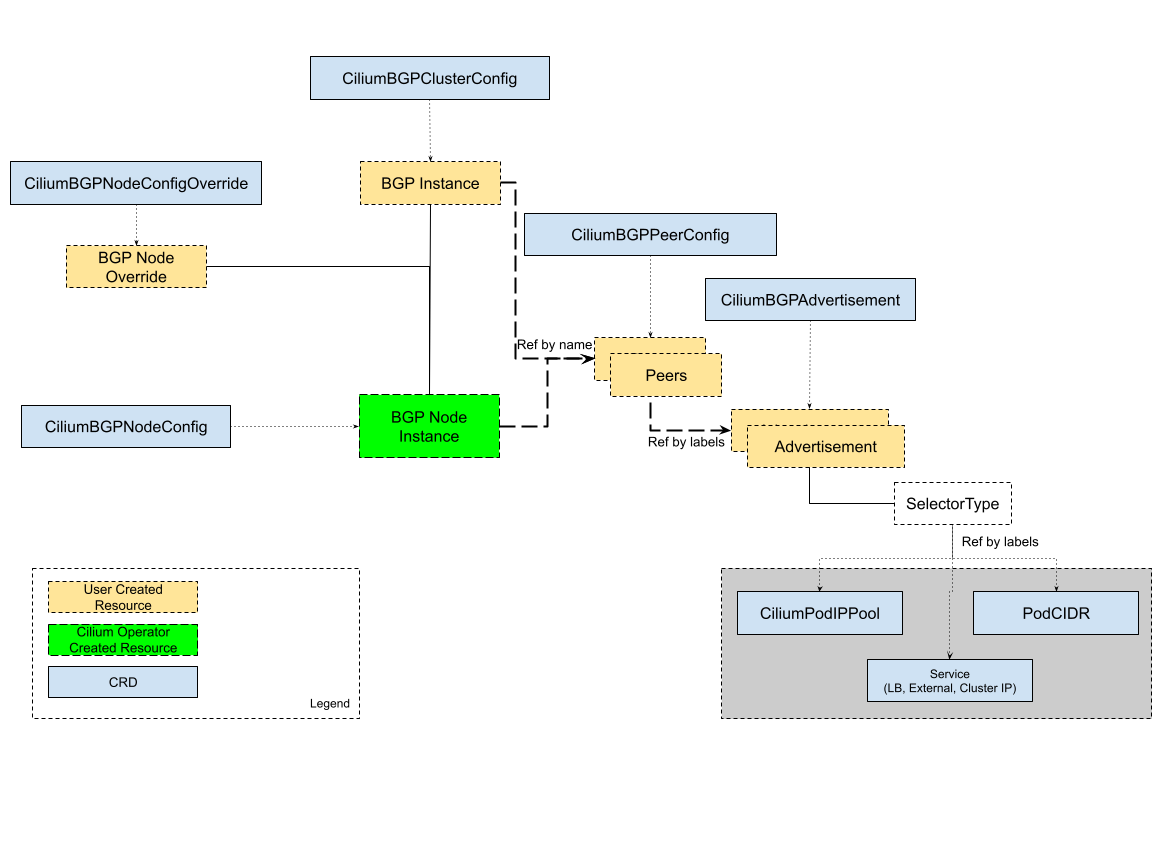
BGP Cluster Configuration
CiliumBGPClusterConfig resource is used to define BGP configuration for one or more nodes in
the cluster based on its nodeSelector field. Each CiliumBGPClusterConfig defines one or
more BGP instances, which are uniquely identified by their name field.
A BGP instance can have one or more peers. Each peer is uniquely identified by its name field. The Peer
autonomous system number and peer address are defined by the peerASN and peerAddress fields,
respectively. The configuration of the peers is defined by the peerConfigRef field, which is a reference
to a peer configuration resource. Group and kind in peerConfigRef are optional and default to
cilium.io and CiliumBGPPeerConfig, respectively.
By default, the BGP Control Plane instantiates each router instance without a listening port. This means
the BGP router can only initiate connections to the configured peers, but cannot accept incoming connections.
This is the default behavior because the BGP Control Plane is designed to function in environments where
another BGP router (such as Bird) is running on the same node. When it is required to accept incoming
connections, the localPort field can be used to specify the listening port.
Warning
Listening on the default BGP port (179) requires CAP_NET_BIND_SERVICE.
If you wish to use the default port, you must grant the
CAP_NET_BIND_SERVICE capability with
securityContext.capabilities.ciliumAgent Helm value.
Here is an example configuration of the CiliumBGPClusterConfig with a BGP instance named instance-65000
and two peers configured under this BGP instance.
apiVersion: cilium.io/v2
kind: CiliumBGPClusterConfig
metadata:
  name: cilium-bgp
spec:
  nodeSelector:
    matchLabels:
      rack: rack0
  bgpInstances:
  - name: "instance-65000"
    localASN: 65000
    localPort: 179
    peers:
    - name: "peer-65000-tor1"
      peerASN: 65000
      peerAddress: fd00:10:0:0::1
      peerConfigRef:
        name: "cilium-peer"
    - name: "peer-65000-tor2"
      peerASN: 65000
      peerAddress: fd00:11:0:0::1
      peerConfigRef:
        name: "cilium-peer"
Auto-Discovery
Cilium BGP Control Plane also supports automatic discovery of BGP peers.
When enabled, the auto-discovery feature self-configures the BGP peer’s IP address automatically. Selection of the specific address is dependent on the mode enabled.
Cilium BGP Control Plane currently supports DefaultGateway mode for auto-discovery under autoDiscovery field in CiliumBGPClusterConfig.
Default Gateway Auto-Discovery
The default gateway auto-discovery mode allows Cilium to automatically discover and establish BGP session with the default gateway (typically a Top-of-Rack (ToR) switch) for a specified address family.
To enable default gateway auto-discovery, configure the autoDiscovery field in the peer configuration:
peers:
- name: "tor-switch"
  peerASN: 65000
  autoDiscovery:
    mode: "DefaultGateway"
    defaultGateway:
      addressFamily: ipv6  # Can be "ipv4" or "ipv6"
  peerConfigRef:
    name: "cilium-peer"
Here are the ToR switch BGP configuration requirements:
ToR switches must be configured with “bgp listen range” to support dynamic BGP neighbors. This configuration enables the ToR switch to accept BGP sessions from Cilium nodes by listening for connections from a specific IP prefix range, eliminating the need to know the exact peer address of each Cilium node.
For more details, see the FRR documentation.
Configure each ToR switch with the same local ASN (Autonomous System Number) to ensure Cilium configuration remains consistent across all cluster nodes.
For example:
router bgp 65100
  neighbor CILIUM peer-group
  neighbor CILIUM local-as 65000 no-prepend replace-as
  bgp listen range fd00:10:0:1::/64 peer-group CILIUM
Once this configuration is applied:
Cilium determines the default gateway for the specified address family on each node
It automatically establishes a BGP session with the discovered gateway
It uses the peer configuration referenced by
peerConfigReffor session parameters
Warning
Link-local address as default gateway is not supported.
Multi-homing with Default Gateway Auto-Discovery
In multi-homing setups, the Cilium node connects to two different Top-of-Rack switches. It discovers both the default gateways, but it picks the default route with the lower metric to establish the BGP session. It’s important to note that Cilium creates only one BGP session per address family at a time. A failure or a change of the default route with the lower metric triggers a reconciliation to establish the BGP session with the default gateway of the other default route.
Example configuration:
bgpInstances:
- name: "65001"
  localASN: 65001
  peers:
  - name: "instance-65001"
    peerASN: 65000
    autoDiscovery:
      mode: "DefaultGateway"
      defaultGateway:
        addressFamily: ipv6
    peerConfigRef:
      name: "cilium-peer"
Verification
To verify that BGP sessions are established with the auto-discovered peers, use the cilium bgp peers command:
$ cilium bgp peers
Local AS   Peer AS   Peer Address         Session       Uptime   Family         Received   Advertised
65001      65000     fd00:10:0:1::1:179   established   21m55s   ipv4/unicast   2          2
                                                                 ipv6/unicast   2          2
Limitations
Auto Discovery with DefaultGateway mode in multi-homing setup can not be used to create multiple BGP sessions for the same address family.
Currently, the only workaround is to configure the peer address manually for each peer.
BGP Peer Configuration
The CiliumBGPPeerConfig resource is used to define a BGP peer configuration. Multiple peers can
share the same configuration and provide reference to the common CiliumBGPPeerConfig
resource.
The CiliumBGPPeerConfig resource contains configuration options for:
Here is an example configuration of the CiliumBGPPeerConfig resource. In the next
section, we will go over each configuration option.
apiVersion: cilium.io/v2
kind: CiliumBGPPeerConfig
metadata:
  name: cilium-peer
spec:
  timers:
    holdTimeSeconds: 9
    keepAliveTimeSeconds: 3
  authSecretRef: bgp-auth-secret
  ebgpMultihop: 4
  gracefulRestart:
    enabled: true
    restartTimeSeconds: 15
  families:
    - afi: ipv4
      safi: unicast
      advertisements:
        matchLabels:
          advertise: "bgp"
MD5 Password
AuthSecretRef in CiliumBGPPeerConfig can be used to configure an RFC-2385 TCP MD5 password
on the session with the BGP peer which references this configuration.
Here is an example of setting authSecretRef:
apiVersion: cilium.io/v2
kind: CiliumBGPPeerConfig
metadata:
  name: cilium-peer
spec:
  authSecretRef: bgp-auth-secret
AuthSecretRef should reference the name of a secret in the BGP secrets
namespace (if using the Helm chart this is kube-system by default). The
secret should contain a key with a name of password.
BGP secrets are limited to a configured namespace to keep the permissions needed on each Cilium Agent instance to a minimum. The Helm chart will configure Cilium to be able to read from it by default.
An example of creating a secret is:
$ kubectl create secret generic -n kube-system --type=string secretname --from-literal=password=my-secret-password
If you wish to change the namespace, you can set the
bgpControlPlane.secretNamespace.name Helm chart value. To have the
namespace created automatically, you can set the
bgpControlPlane.secretNamespace.create Helm chart value to true.
Because TCP MD5 passwords sign the header of the packet they cannot be used if the session is address-translated by Cilium (in other words, the Cilium Agent’s pod IP address must be the address that the BGP peer sees).
If the password is incorrect, or if the header is otherwise changed, then the TCP
connection will not succeed. This will appear as dial: i/o timeout in the
Cilium Agent’s logs rather than a more specific error message.
If a CiliumBGPPeerConfig is deployed with an authSecretRef that Cilium cannot find,
the BGP session will use an empty password and the agent will log an error such as in the following example:
level=error msg="Failed to fetch secret \"secretname\": not found (will continue with empty password)" component=manager.fetchPeerPassword subsys=bgp-control-plane
Timers
BGP Control Plane supports modifying the following BGP timer parameters. For more detailed description for each timer parameters, please refer to RFC4271.
Name |
Field |
Default |
ConnectRetryTimer |
|
120 |
HoldTimer |
|
90 |
KeepaliveTimer |
|
30 |
In datacenter networks where Kubernetes clusters are deployed, it is generally
recommended to set the HoldTimer and KeepaliveTimer to a lower value
for faster possible failure detection. For example, you can set the minimum
possible values holdTimeSeconds=9 and keepAliveTimeSeconds=3.
To ensure a fast reconnection after losing connectivity with the peer,
reduce the connectRetryTimeSeconds (for example to 5 or less).
As random jitter is applied to the configured value internally, the actual value used for the
ConnectRetryTimer is within the interval [ConnectRetryTimeSeconds, 2 * ConnectRetryTimeSeconds).
apiVersion: cilium.io/v2
kind: CiliumBGPPeerConfig
metadata:
  name: cilium-peer
spec:
  timers:
    connectRetryTimeSeconds: 5
    holdTimeSeconds: 9
    keepAliveTimeSeconds: 3
EBGP Multihop
By default, IP TTL of the BGP packets is set to 1 in eBGP. Generally, it is encouraged to not change the TTL, but in some cases, you may need to change the TTL value. For example, when the BGP peer is a Route Server and located in a different subnet, you may need to set the TTL value to more than 1.
apiVersion: cilium.io/v2
kind: CiliumBGPPeerConfig
metadata:
  name: cilium-peer
spec:
  ebgpMultihop: 4 # <-- specify the TTL value
Graceful Restart
The Cilium BGP Control Plane can be configured to act as a graceful restart
Restarting Speaker. When you enable graceful restart, the BGP session restarts
and the “graceful restart” capability is advertised in the BGP OPEN message.
In the event of a Cilium Agent restart, the peering BGP router does not withdraw routes received from the Cilium BGP control plane immediately. The datapath continues to forward traffic during Agent restart, so there is no traffic disruption.
Optionally, you can use the restartTimeSeconds parameter. RestartTime is the time
advertised to the peer within which Cilium BGP control plane is expected to re-establish
the BGP session after a restart. On expiration of RestartTime, the peer removes
the routes previously advertised by the Cilium BGP control plane.
apiVersion: cilium.io/v2
kind: CiliumBGPPeerConfig
metadata:
  name: cilium-peer
spec:
  gracefulRestart:
    enabled: true
    restartTimeSeconds: 15
When the Cilium Agent restarts, it closes the BGP TCP socket, causing the emission of a
TCP FIN packet. On receiving this TCP FIN, the peer changes its BGP state to Idle and
starts its RestartTime timer.
The Cilium agent boot up time varies depending on the deployment. If using RestartTime,
you should set it to a duration greater than the time taken by the Cilium Agent to boot up.
Default value of RestartTime is 120 seconds. More details on graceful restart and
RestartTime can be found in RFC-4724 and RFC-8538.
Transport
The transport section of CiliumBGPPeerConfig can be used to tweak connection settings for a peer’s BGP session.
By default, when BGP is operating in active mode
(with the Cilium agent initiating the TCP connection), the destination port is 179 and the source port is ephemeral.
The peerPort field can be used to configure a custom destination port.
The source IP address for the BGP session is by default auto-detected based on the egress interface.
The sourceInterface field can be used to override this with the IP address applied in the provided
network interface. The interface must not have more than one non-loopback, non-multicast
and non-link-local-IPv6 address per address family.
Here is an example of setting the transport configuration:
apiVersion: cilium.io/v2
kind: CiliumBGPPeerConfig
metadata:
  name: cilium-peer
spec:
  transport:
    peerPort: 179
    sourceInterface: lo
Address Families
The families field is a list of AFI (Address Family Identifier), SAFI (Subsequent Address
Family Identifier) pairs, and advertisement selector. The only AFI/SAFI options currently supported are
{afi: ipv4, safi: unicast} and {afi: ipv6, safi: unicast}.
By default, if no address families are specified, BGP Control Plane sends both IPv4 Unicast and IPv6 Unicast Multiprotocol Extensions Capability (RFC-4760) to the peer.
In each address family, you can control the route publication via the advertisements label selector.
Various advertisements types are defined here.
Note
Without matching advertisements, no prefix will be advertised to the peer. Default configuration is to not advertise any prefix.
apiVersion: cilium.io/v2
kind: CiliumBGPPeerConfig
metadata:
  name: cilium-peer
spec:
  families:
    - afi: ipv4
      safi: unicast
      advertisements:
        matchLabels:
          advertise: "bgp"
    - afi: ipv6
      safi: unicast
      advertisements:
        matchLabels:
          advertise: "bgp"
BGP Advertisements
The CiliumBGPAdvertisement resource is used to define various advertisement types and attributes
associated with them. The advertisements label selector defined in the families field of a
peer configuration may match with one or more of the CiliumBGPAdvertisement
resources.
BGP Attributes
You can configure BGP path attributes for the prefixes advertised by Cilium BGP
control plane using attributes field in advertisements[*]. There are two types of Path
Attributes that can be advertised: Communities and LocalPreference.
Here is an example configuration of the CiliumBGPAdvertisement resource that advertises
pod prefixes with the community value of “65000:99” and local preference of 99.
apiVersion: cilium.io/v2
kind: CiliumBGPAdvertisement
metadata:
  name: bgp-advertisements
  labels:
    advertise: bgp
spec:
  advertisements:
    - advertisementType: "PodCIDR"
      attributes:
        communities:
          standard: [ "65000:99" ]
        localPreference: 99
Community
Communities defines a set of community values advertised in the supported BGP Communities
Path Attributes.
The values can be of three types:
Standard: represents a value of the “standard” 32-bit BGP Communities Attribute (RFC-1997) as a 4-byte decimal number or two 2-byte decimal numbers separated by a colon (for example:64512:100).
WellKnown: represents a value of the “standard” 32-bit BGP Communities Attribute (RFC-1997) as a well-known string alias to its numeric value. Allowed values and their mapping to the numeric values are displayed in the following table:
Well-Known Value
Hexadecimal Value
16-bit Pair Value
internet
0x00000000
0:0
planned-shut
0xffff0000
65535:0
accept-own
0xffff0001
65535:1
route-filter-translated-v4
0xffff0002
65535:2
route-filter-v4
0xffff0003
65535:3
route-filter-translated-v6
0xffff0004
65535:4
route-filter-v6
0xffff0005
65535:5
llgr-stale
0xffff0006
65535:6
no-llgr
0xffff0007
65535:7
blackhole
0xffff029a
65535:666
no-export
0xffffff01
65535:65281
no-advertise
0xffffff02
65535:65282
no-export-subconfed
0xffffff03
65535:65283
no-peer
0xffffff04
65535:65284
Large: represents a value of the BGP Large Communities Attribute (RFC-8092), as three 4-byte decimal numbers separated by colons (for example:64512:100:50).
Local Preference
LocalPreference defines the preference value advertised in the BGP Local Preference Path Attribute.
As Local Preference is only valid for iBGP peers, this value will be ignored for eBGP peers
(no Local Preference Path Attribute will be advertised).
Advertisement Types
The following advertisement types are supported by Cilium:
Pod CIDR Ranges
The BGP Control Plane can advertise the Pod CIDR prefixes of the nodes. This allows the BGP peers and the connected network to reach the Pods directly without involving load balancers or NAT. There are two ways to advertise PodCIDRs depending on the IPAM mode setting.
Note
Cilium BGP control plane advertises pod CIDR allocated to the node and not the entire range.
Kubernetes and ClusterPool IPAM
When Kubernetes or ClusterPool IPAM is used, set advertisement type to PodCIDR.
apiVersion: cilium.io/v2
kind: CiliumBGPAdvertisement
metadata:
  name: bgp-advertisements
  labels:
    advertise: bgp
spec:
  advertisements:
    - advertisementType: "PodCIDR"
With this configuration, the BGP instance on the node advertises the Pod CIDR prefixes assigned to the local node.
MultiPool IPAM
When MultiPool IPAM is used, specify the
advertisementType field to CiliumPodIPPool. The selector field
is a label selector that selects CiliumPodIPPool matching the specified .matchLabels
or .matchExpressions.
apiVersion: cilium.io/v2
kind: CiliumPodIPPool
metadata:
  name: default
  labels:
    pool: blue
apiVersion: cilium.io/v2
kind: CiliumBGPAdvertisement
metadata:
  name: pod-ip-pool-advert
  labels:
    advertise: bgp
spec:
  advertisements:
    - advertisementType: "CiliumPodIPPool"
      selector:
        matchLabels:
          pool: "blue"
This configuration advertises the PodCIDR prefixes allocated from the selected
Cilium pod IP pools. Note that the CIDR must be allocated to a CiliumNode resource.
If you wish to announce all CiliumPodIPPool CIDRs within the cluster, a NotIn match
expression with a dummy key and value can be used like this:
apiVersion: cilium.io/v2
kind: CiliumBGPAdvertisement
metadata:
  name: pod-ip-pool-advert
  labels:
    advertise: bgp
spec:
  advertisements:
    - advertisementType: "CiliumPodIPPool"
      selector:
        matchExpressions:
        - {key: somekey, operator: NotIn, values: ['never-used-value']}
There are two special-purpose selector fields that match CiliumPodIPPools based on name and/or
namespace metadata instead of labels:
Selector |
Field |
io.cilium.podippool.namespace |
|
io.cilium.podippool.name |
|
For additional details regarding CiliumPodIPPools, see the Multi-Pool section.
Other IPAM Types
When using other IPAM types, the BGP Control Plane does not support advertising
PodCIDRs and specifying advertisementType: "PodCIDR" doesn’t have any
effect.
Service Virtual IPs
In Kubernetes, a Service can have multiple virtual IP addresses,
such as .spec.clusterIP, .spec.clusterIPs, .status.loadBalancer.ingress[*].ip
or .spec.externalIPs.
The BGP control plane can advertise the virtual IP address of the Service to BGP peers. This allows you to directly access the Service from outside the cluster.
Note
Cilium BGP Control Plane advertises exact routes for the VIPs ( /32 or /128 prefixes ).
To advertise the service virtual IPs, specify the advertisementType field to Service
and the service.addresses field to LoadBalancerIP, ClusterIP or ExternalIP.
The .selector field is a label selector that selects Services matching the specified .matchLabels
or .matchExpressions.
apiVersion: cilium.io/v2
kind: CiliumBGPAdvertisement
metadata:
  name: bgp-advertisements
  labels:
    advertise: bgp
spec:
  advertisements:
    - advertisementType: "Service"
      service:
        addresses:
          - ClusterIP
          - ExternalIP
          - LoadBalancerIP
      selector:
        matchExpressions:
          - { key: bgp, operator: In, values: [ blue ] }
When your upstream router supports Equal Cost Multi Path (ECMP), you can use this feature to load-balance traffic to the Service across multiple nodes by advertising the same virtual IPs from multiple nodes.
Warning
Many routers have a limit on the number of ECMP paths they can hold in their routing table (Juniper). When advertising the Service VIPs from many nodes, you may exceed this limit. We recommend checking the limit with your network administrator before using this feature.
ExternalIP
If you wish to use this together with kubeProxyReplacement feature (see Kubernetes Without kube-proxy docs),
please make sure the ExternalIP support is enabled.
If you only wish to advertise the .spec.externalIPs of a Service, you can specify the
service.addresses field as ExternalIP.
apiVersion: cilium.io/v2
kind: CiliumBGPAdvertisement
metadata:
  name: bgp-advertisements
  labels:
    advertise: bgp
spec:
  advertisements:
    - advertisementType: "Service"
      service:
        addresses:                  # <-- specify the service types to advertise
          - ExternalIP
      selector:                     # <-- select Services to advertise
        matchExpressions:
          - { key: bgp, operator: In, values: [ blue ] }
ClusterIP
If you wish to use this together with kubeProxyReplacement feature (see Kubernetes Without kube-proxy docs),
specific BPF parameters need to be enabled.
See External Access To ClusterIP Services section
for how to enable it.
If you only wish to advertise the .spec.clusterIP and .spec.clusterIPs of a Service,
you can specify the virtualRouters[*].serviceAdvertisements field as ClusterIP.
apiVersion: cilium.io/v2
kind: CiliumBGPAdvertisement
metadata:
  name: bgp-advertisements
  labels:
    advertise: bgp
spec:
  advertisements:
    - advertisementType: "Service"
      service:
        addresses:          # <-- specify the service types to advertise
          - ClusterIP
      selector:             # <-- select Services to advertise
        matchExpressions:
          - { key: bgp, operator: In, values: [ blue ] }
Load Balancer IP
You must first allocate ingress IPs to advertise them. By default, Kubernetes doesn’t provide a way to assign ingress IPs to a Service. The cluster administrator is responsible for preparing a controller that assigns ingress IPs. Cilium supports assigning ingress IPs with the Load Balancer IPAM feature.
apiVersion: cilium.io/v2
kind: CiliumBGPAdvertisement
metadata:
  name: bgp-advertisements
  labels:
    advertise: bgp
spec:
  advertisements:
    - advertisementType: "Service"
      service:
        addresses:          # <-- specify the service types to advertise
          - LoadBalancerIP
      selector:             # <-- select Services to advertise
        matchExpressions:
          - { key: bgp, operator: In, values: [ blue ] }
This advertises the ingress IPs of all Services matching the .selector.
If you wish to announce all services within the cluster, a NotIn match expression
with a dummy key and value can be used like this:
apiVersion: cilium.io/v2
kind: CiliumBGPAdvertisement
metadata:
  name: bgp-advertisements
  labels:
    advertise: bgp
spec:
  advertisements:
    - advertisementType: "Service"
      service:
        addresses:          # <-- specify the service types to advertise
          - LoadBalancerIP
      selector:             # <-- select all services
        matchExpressions:
         - {key: somekey, operator: NotIn, values: ['never-used-value']}
There are a few special purpose selector fields that don’t match on labels but
instead on other metadata like .meta.name or .meta.namespace.
Selector |
Field |
io.kubernetes.service.namespace |
|
io.kubernetes.service.name |
|
Load Balancer Class
Cilium supports the loadBalancerClass.
When the load balancer class is set to io.cilium/bgp-control-plane or unspecified,
Cilium announces the ingress IPs of the Service. Otherwise, Cilium does not announce
the ingress IPs of the Service.
ExternalTrafficPolicy/InternalTrafficPolicy
In the case of a load-balancer ingress IP or external IP advertisements,
if the Service has externalTrafficPolicy: Cluster, BGP Control Plane
unconditionally advertises the IPs of the selected Service. When the
Service has externalTrafficPolicy: Local, BGP Control Plane keeps track of
the endpoints for the service on the local node and stops advertisement when
there’s no local endpoint.
Similarly, internalTrafficPolicy is considered for ClusterIP advertisements.
Note
It is worth noting that when you configure service.addresses as ClusterIP,
the BGP Control Plane only considers the configuration of the matching service’s .spec.internalTrafficPolicy
and ignores the configuration of .spec.externalTrafficPolicy. For ExternalIP and
LoadBalancerIP, it only considers the configuration of the service’s .spec.externalTrafficPolicy
and ignores the configuration of .spec.internalTrafficPolicy.
Overlapping Advertisements
When configuring CiliumBGPAdvertisement, it is possible that two or more
advertisements match the same Service. Prior to Cilium 1.18, overlapping matches
were not expected and the last sequential match was used. Today, overlapping
advertisement selectors are supported. Overlap handling varies by attribute:
Communities: the union of elements is taken across all matches
Local Preference: the largest value is selected
As an example, below we have two advertisements which each define a selector
match. One matches on the label vpc1 while the other on vpc2.
apiVersion: cilium.io/v2
kind: CiliumBGPAdvertisement
metadata:
  name: bgp-advertisements
  labels:
    advertise: bgp
spec:
  advertisements:
    - advertisementType: "Service"
      service:
        addresses:
          - LoadBalancerIP
      selector:
        matchExpressions:
          - { key: vpc1, operator: In, values: [ "true" ] }
      attributes:
        communities:
          large: [ "1111:1111:1111" ]
    - advertisementType: "Service"
      service:
        addresses:
          - LoadBalancerIP
      selector:
        matchExpressions:
          - { key: vpc2, operator: In, values: [ "true" ] }
      attributes:
        communities:
          large: [ "2222:2222:2222" ]
We have a deployment named hello-world which exposes a LoadBalancer
Service. Initially, there were no labels configured. This resulted in no matches, and
no BGP advertisements.
kubectl get deployment
NAME          READY   UP-TO-DATE   AVAILABLE   AGE
hello-world   1/1     1            1           42m

kubectl get service hello-world --show-labels
NAME          TYPE           CLUSTER-IP   EXTERNAL-IP   PORT(S)          AGE   LABELS
hello-world   LoadBalancer   10.2.65.71   <pending>     8080:30569/TCP   43m   app=hello-world
Labels were then configured using:
kubectl label service hello-world vpc1=true
kubectl label service hello-world vpc2=true
The resulting BGP advertisement set both communities 1111:1111:1111 and 2222:2222:2222.
All possible combinations of communities (Standard, Large, WellKnown) are
supported. Had Local Preference been set, it would have been the largest value observed
across all matches. This is in line with RFC4271
which states The higher degree of preference MUST be preferred.
Prefix Aggregation
By default, the Cilium BGP Control Plane advertises exact routes for service
VIPs (/32 or /128 prefixes). You can modify the advertised prefix length with
the .service.aggregationLengthIPv4 and/or .service.aggregationLengthIPv6
fields (for IPv4 and/or IPv6 prefixes respectively) as in the following example:
apiVersion: cilium.io/v2
kind: CiliumBGPAdvertisement
metadata:
  name: bgp-advertisements
  labels:
    advertise: bgp
spec:
  advertisements:
    - advertisementType: "Service"
      service:
        aggregationLengthIPv4: 24
        aggregationLengthIPv6: 120
        addresses:
          - ClusterIP
          - ExternalIP
          - LoadBalancerIP
      selector:
        matchExpressions:
          - { key: bgp, operator: In, values: [ blue ] }
Note
The .service.aggregationLengthIPv4 / .service.aggregationLengthIPv6
fields are ignored when advertising ExternalIP or LoadBalancerIP of
services with externalTrafficPolicy: Local. Similarly, they are
ignored when advertising ClusterIP of services with
internalTrafficPolicy: Local.
There are some known issues for using this feature:
Prefix aggregation in general has a risk of creating black holes or routing loops when you advertise routes that cannot be handled well by the datapath. In Cilium, there’s a known issue where sending traffic to a VIP range not assigned to a Service causes a routing loop (see this issue for more details). This means that if you advertise an aggregated prefix, and part of the address range is not assigned to a Service, then traffic sent to that address will end up in a routing loop.
The behavior is undefined when multiple Service advertisements end up advertising the same prefix through aggregation, but with different path attributes. You can track this issue for updates.
Interface IPs
The BGP control plane can advertise arbitrary IP addresses assigned on a local interface to BGP peers. This can be useful for example in multi-homing setups, where a common node’s loopback address can be advertised via multiple BGP sessions over different network interfaces.
The interface IPs are advertised as exact routes (/32 or /128 prefixes).
IP addresses from the loopback, multicast, IPv6 link-local and IPv4-mapped IPv6 address ranges are not advertised.
Note
The interface must be administratively enabled and in operationally up or unknown state
in order to advertise its IP addresses.
The following example can be used to advertise IP addresses assigned on a local interface with the name lo:
apiVersion: cilium.io/v2
kind: CiliumBGPAdvertisement
metadata:
  name: bgp-advertisements
  labels:
    advertise: bgp
spec:
  advertisements:
    - advertisementType: "Interface"
      interface:
        name: lo
Note
Cilium does not manage IP addresses on arbitrary (non-Cilium-owned) local interfaces, the node administrator must configure them themselves.
BGP Configuration Override
The CiliumBGPNodeConfigOverride resource can be used to override some of the auto-generated configuration
on a per-node basis.
Here is an example of the CiliumBGPNodeConfigOverride resource, that sets Router ID, local address and
local autonomous system number used in each peer for the node with a name bgp-cplane-dev-multi-homing-worker.
apiVersion: cilium.io/v2
kind: CiliumBGPNodeConfigOverride
metadata:
  name: bgp-cplane-dev-multi-homing-worker
spec:
  bgpInstances:
    - name: "instance-65000"
      routerID: "192.168.10.1"
      localPort: 1790
      localASN: 65010
      peers:
        - name: "peer-65000-tor1"
          localAddress: fd00:10:0:2::2
        - name: "peer-65000-tor2"
          localAddress: fd00:11:0:2::2
Note
The name of CiliumBGPNodeConfigOverride resource must match the name of the node for which the
configuration is intended. Similarly, the names of the BGP instance and peers must match with what
is defined under CiliumBGPClusterConfig.
This is a per node configuration.
RouterID
There is bgpControlPlane.routerIDAllocation.mode Helm chart value, which stipulates how the
Router ID is allocated. Currently, default and ip-pool are supported. The default allocation mode
is default.
In default mode, when Cilium runs on an IPv4 single-stack or a dual-stack, the BGP Control Plane
can use the IPv4 address assigned to the node as the BGP Router ID because the Router ID is 32 bit-long,
and we can rely on the uniqueness of the IPv4 address to make the Router ID unique. When running in an IPv6 single-stack,
the lower 32 bits of MAC address of cilium_host interface are used as Router ID.
In ip-pool mode, you must provide an IPv4 IP pool like 10.0.0.0/24 to Cilium through the helm value
bgpControlPlane.routerIDAllocation.ipPool. Cilium will then assign Router IDs to BGP instances from this configured pool.
If the auto assignment of the Router ID is not desired, you must manually define it.
In order to configure custom Router ID, you can set routerID field in an IPv4 address format. In default mode,
you can manually set any Router ID, and Cilium does not validate it. In ip-pool mode, if the Router ID is within the pool range,
you must ensure it does not conflict with others. If the Router ID is outside the pool, you can set it freely.
Listening Port
The localPort field in the CiliumBGPClusterConfig can be used to
specify the listening port. If you wish to override it on a per-node basis, you
can set the localPort field in the CiliumBGPNodeConfigOverride
resource. This also works even if the localPort field is not set in the
CiliumBGPClusterConfig.
Local Peering Address
The source interface and the address used by the BGP Control Plane in order to setup peering with the
neighbor are based on a route lookup of the peer address defined in CiliumBGPClusterConfig. There may be
use cases where multiple links are present on the node and you want tighter control over which link
BGP peering should be setup.
To configure the source address, the peers[*].localAddress field can be set. It should be an
address configured on one of the links on the node.
Local ASN
It is possible to override the Autonomous System Number (ASN) of a node using the field LocalASN of the
CiliumBGPNodeConfigOverride resource. When this field is not defined, the LocalASN from the matching
CiliumBGPClusterConfig is used as local ASN for the node. This customization allows individual nodes to
operate with a different ASN when required by the network design.
Sample Configurations
Please refer to container lab examples in Cilium repository under contrib/containerlab.