

Azure IPAM
Note
On AKS, the recommended ways to run Cilium are:
Azure CNI Powered by Cilium: AKS fully manages Cilium’s deployment and configuration. The cluster is created with
--network-dataplane cilium. IP allocation is handled by AKS’s own controllers via Azure Delegated IPAM. See Installation using Azure CNI Powered by Cilium in AKS.Bring your own CNI (BYOCNI): the cluster is created with
--network-plugin=noneand the administrator self-manages Cilium (via Helm or the cilium-cli) with any Cilium IPAM backend.
Azure IPAM (this page) is designed for non-AKS self-managed clusters running on Azure VMs or VMSSs.
The Azure IPAM allocator is specific to Cilium deployments running in the Azure cloud and performs IP allocation based on Azure Private IP addresses.
The architecture ensures that only a single operator communicates with the Azure API to avoid rate-limiting issues in large clusters. A pre-allocation watermark allows to maintain a number of IP addresses to be available for use on nodes at all time without requiring to contact the Azure API when a new pod is scheduled in the cluster.
Architecture
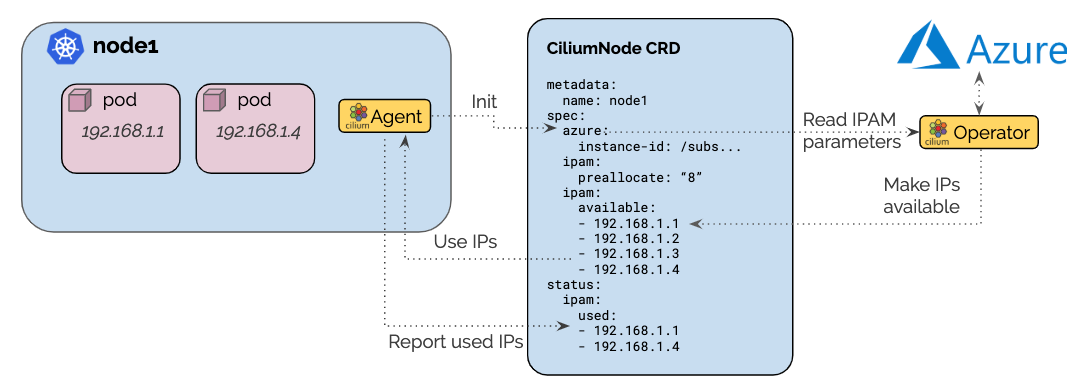
Azure IPAM coordinates the operator and the agent through a
ciliumnodes.cilium.io custom resource matching the node name. When Cilium
starts, the agent retrieves the Kubernetes v1.Node resource and uses its
.spec.providerID field to derive the Azure instance ID.
Azure allocation parameters are provided as agent configuration and copied to
the custom resource.
The Cilium operator listens for new CiliumNode resources, scans the Azure
instance’s interfaces, and publishes the discovered interfaces, their address
provisioning states, and available routing metadata in
status.azure.interfaces. Subnet CIDRs and gateways are present only when
the operator can retrieve the corresponding subnet details. The agent treats
each valid address in status.azure.interfaces[].addresses whose state is
succeeded as a host prefix in the default multi-pool IPAM pool. It reports
its address target in spec.ipam.pools.requested and records the host
prefixes it is retaining in spec.ipam.pools.allocated. The operator
allocates additional Azure private IP addresses as needed to maintain the
pre-allocation watermark.
Configuration
The Cilium agent and operator must be run with the option
--ipam=azureor the optionipam: azuremust be set in the ConfigMap. This will enable Azure IPAM allocation in both the node agent and operator.In most scenarios, it makes sense to automatically create the
ciliumnodes.cilium.iocustom resource when the agent starts up on a node for the first time. To enable this, specify the option--auto-create-cilium-node-resourceor setauto-create-cilium-node-resource: "true"in the ConfigMap.It is generally a good idea to enable metrics in the Operator as well with the option
--enable-metrics. See the section Running Prometheus & Grafana for additional information how to install and run Prometheus including the Grafana dashboard.
Operator scope: subscription, resource group, identity
The operator talks to Azure using three pieces of context. Each can be
auto-detected from the Azure Instance Metadata Service (IMDS)
or set explicitly via the --azure-* operator flags.
- Subscription (
--azure-subscription-id) All Azure SDK clients are bound to a single subscription. If unset, the operator detects the subscription of the node it runs on via its IMDS.
- Resource group (
--azure-resource-group) Scopes per-resource-group API calls such as listing interfaces, VMSS, and Public IP Prefixes. For VMSS nodes, this must be the resource group that contains the VMSS. For standalone nodes, private-IP discovery and allocation use the resource group that contains the attached network interfaces. When static public IP allocation is enabled for a standalone node, the current API paths require its VM, primary network interface, and Public IP Prefix to be in this configured resource group. If unset, the operator detects the resource group of the node it runs on via IMDS; that value is correct only when it is also the resource group required by the node topology described above.
- VNet / subnet resource group
The operator derives the VNet and subnet resource group from each interface’s subnet ID at runtime, there is no flag for it. When VNets live in a shared networking resource group, the operator’s identity needs to have read access there.
Authentication
The operator authenticates using the Azure Identity SDK. Two modes are supported:
- Default credential chain (no flag set)
When
--azure-user-assigned-identity-idis empty, the operator calls DefaultAzureCredential, which tries, in order: environment variables, workload identity (projected token), system-assigned managed identity, then Azure CLI. This is the recommended path for AKS clusters using Azure AD Workload Identity.- User-assigned managed identity (
--azure-user-assigned-identity-id) When set, the operator authenticates as a specific user-assigned managed identity. The value must be the identity’s client ID (a UUID), not its full Azure resource ID (
/subscriptions/.../userAssignedIdentities/...). The client ID is visible in the identity’s overview blade in the Azure portal or viaaz identity show -g <resource-group> -n <name> --query clientId -o tsv.
Custom Azure IPAM Configuration
Custom Azure IPAM configuration can be defined from Helm or with a custom CNI
configuration ConfigMap.
If you configure both helm and Custom CNI for the same field, Custom CNI is preferred over Helm configuration.
Helm
The Azure IPAM configuration can be specified via Helm, using either the --set flag
or the helm value file.
The following example configures Cilium to:
Use the interface
eth0for pod IP allocation.Set the minimum number of IPs to allocate to 10.
helm upgrade cilium cilium/cilium --version 1.20.0 \
   --namespace kube-system \
   --reuse-values \
   --set azure.enabled=true \
   --set azure.nodeSpec.azureInterfaceName=eth0 \
   --set ipam.nodeSpec.ipamMinAllocate=10
helm upgrade cilium oci://quay.io/cilium/charts/cilium --version 1.20.0 \
   --namespace kube-system \
   --reuse-values \
   --set azure.enabled=true \
   --set azure.nodeSpec.azureInterfaceName=eth0 \
   --set ipam.nodeSpec.ipamMinAllocate=10
The full list of available options can be found in the Helm Reference
section in the azure.nodeSpec and ipam.nodeSpec sections.
Create a CNI configuration
Create a cni-config.yaml file based on the template below. Fill in the
interface-name field:
apiVersion: v1
kind: ConfigMap
metadata:
  name: cni-configuration
  namespace: kube-system
data:
  cni-config: |-
    {
      "cniVersion":"0.3.1",
      "name":"cilium",
      "plugins": [
        {
          "cniVersion":"0.3.1",
          "type":"cilium-cni",
          "azure": {
            "interface-name":"eth0"
          }
        }
      ]
    }
Additional parameters may be configured in the azure or ipam section of
the CNI configuration file. See the list of Azure allocation parameters below
for a reference of the supported options.
Deploy the ConfigMap:
kubectl apply -f cni-config.yaml
Configure Cilium to use the custom CNI configuration
Using the instructions above to deploy Cilium and CNI config, specify the following additional arguments to Helm:
--set cni.customConf=true \
--set cni.configMap=cni-configuration
Azure Allocation Parameters
The following parameters are available to control the IP allocation:
spec.ipam.min-allocateThe minimum number of IPs that must be allocated when the node is first bootstrapped. It defines the minimum base socket of addresses that must be available. After reaching this watermark, the PreAllocate and MaxAboveWatermark logic takes over to continue allocating IPs.
If unspecified, no minimum number of IPs is required.
spec.ipam.pre-allocateThe number of IP addresses that must be available for allocation at all times. It defines the buffer of addresses available immediately without requiring for the operator to get involved.
If unspecified, this value defaults to 8.
spec.azure.interface-nameThe name of the interface to use for IP allocation.
Operational Details
Cache of Interfaces and Subnets
The operator maintains an in-memory cache of the instances and interfaces it discovers in the configured Azure resource group. It retrieves details only for the subnets referenced by those interfaces. On startup, it rebuilds the cache with a blocking initial synchronization.
The operator refreshes the full cache once per minute. A successful private-IP allocation that changes an instance triggers a targeted synchronization of that instance.
Publication of available IPs
Following a full or targeted cache update, the operator reconciles the
CiliumNode resources for affected nodes. It publishes each discovered Azure
interface and the provisioning state of each listed address in
status.azure.interfaces. When subnet lookup succeeds, it also publishes the
subnet CIDR and gateway. Agents using the multi-pool protocol derive the
default-pool allocation from valid addresses in this status whose state is
succeeded. The operator also updates the legacy spec.ipam.pool map for
agents using the CRD allocator.
The agent writes its address target to the default entry in
spec.ipam.pools.requested and records the host prefixes it is retaining in
spec.ipam.pools.allocated.
Native-routing readiness
The agent requires at least one valid IPv4 subnet CIDR in
status.azure.interfaces[].subnet.cidr before it can complete Azure IPAM
initialization. The operator publishes interfaces in interface-ID order, and
the agent selects the first valid IPv4 subnet CIDR in that list. This selection
is independent of spec.azure.interface-name. If
--ipv4-native-routing-cidr is unset, the agent uses the selected subnet CIDR
as its native-routing CIDR. If the option is set, its value must overlap the
selected subnet CIDR or initialization fails. Once startup reaches the
provider-readiness check, the agent waits up to five minutes for such a CIDR
before failing initialization.
Determination of IP deficits or excess
The operator constantly monitors all nodes and detects deficits in available IP addresses. The check to recognize a deficit is performed on two occasions:
When a
CiliumNodecustom resource is updatedAll nodes are scanned in a regular interval (once per minute)
Agents using the multi-pool protocol report an address target in the default
entry of spec.ipam.pools.requested. The target consists of locally in-use
addresses, outstanding pending allocation requests, and the
spec.ipam.pre-allocate buffer. The operator subtracts that buffer to derive
the effective in-use and pending demand, then applies the configured allocation
watermarks against the successful addresses on the Azure interfaces. For an
agent using the legacy CRD allocator, the operator instead obtains usage from
status.ipam.used.
Upon detection of a deficit, the operator schedules pool maintenance for the node. During interval-based scans, nodes with the largest deficit are scheduled first. Maintenance can run concurrently for multiple nodes, and Azure API calls are subject to the operator’s configured IPAM API rate limits.
IP Allocation
When performing IP allocation for a node with an address deficit, the operator first looks at the interfaces already attached to the instance represented by the CiliumNode resource.
The operator will then pick the first interface which meets the following criteria:
The interface has addresses associated which are not yet used or the number of addresses associated with the interface is lesser than maximum number of addresses that can be associated to an interface.
The subnet associated with the interface has IPs available for allocation
The following formula is used to determine how many IPs are allocated on the interface:
min(AvailableOnSubnet, min(AvailableOnInterface, NeededAddresses + spec.ipam.max-above-watermark))
This means that the number of IPs allocated in a single allocation cycle can be
less than what is required to fulfill spec.ipam.pre-allocate.
Static Public IP Allocation
Nodes can be assigned static public IPs from tagged Azure Public IP Prefixes.
Create and tag a Public IP Prefix in the resource group selected by
--azure-resource-group:$ az network public-ip prefix create \ --resource-group $RESOURCE_GROUP \ --name $PREFIX_NAME \ --length 28 \ --tags prefix-tag-key=prefix-tag-value
Set
ipam.static-ip-tagsin the CNI configuration:{ "ipam": { "static-ip-tags": { "prefix-tag-key": "prefix-tag-value" } } }
If the node’s primary IP configuration already references a usable public IP,
the operator reuses and records that address without selecting a new prefix.
Otherwise, it selects a successfully provisioned Public IP Prefix that matches
all configured tags and reports available capacity. The assigned or reused
public IP address is stored in the CiliumNode resource’s
status.ipam.assigned-static-ip field.
IP Release
Azure IPAM does not release excess private IP addresses from interfaces.
Addresses that the agent removes from spec.ipam.pools.allocated remain
attached and can be admitted to the default pool again if demand grows.
Node Termination
When a node or instance terminates, the Kubernetes apiserver will send a node
deletion event. This event will be picked up by the operator and the operator
will delete the corresponding ciliumnodes.cilium.io custom resource.
Masquerading
Masquerading is supported via the eBPF ip-masq-agent or by setting --ipv4-native-routing-cidr.
Required Privileges
The identity used by the operator (managed identity, service principal, or workload identity federation) needs Azure RBAC permissions on two or three scopes depending on topology:
- Configured resource group
Grants read on VMSS and network interfaces, and the writes needed to attach IP configurations. On VMSS this is a write on the VMSS instance’s VM model; on standalone nodes it is a write on the network interface itself (see the
Actionsbreakdown below for the exact permissions). This is the resource group passed via--azure-resource-groupor auto-detected from IMDS. The required resource placement for VMSS and standalone nodes is described in the configuration section above.- VNet / subnet resource group
Grants read on the VNet and subnets, and the
subnets/join/actionused when attaching new private IPs. Often the same as the node resource group, but can be a separate networking resource group.- Subscription (optional)
Only required if you want VNet discovery to work across multiple resource groups from a single role assignment.
Listcalls filter by RBAC, so subscription-wide Reader is not mandatory, scoping the same actions to each relevant resource group is sufficient.
Minimum Actions for a custom role
The set of required Actions depends on the node type (VMSS instances
vs. standalone VMs) and on whether static public IP allocation is enabled.
Common to every deployment:
Microsoft.Network/networkInterfaces/read
Microsoft.Network/virtualNetworks/read
Microsoft.Network/virtualNetworks/subnets/read
Microsoft.Network/virtualNetworks/subnets/join/action
Microsoft.Compute/virtualMachineScaleSets/read
For VMSS-based clusters, add:
Microsoft.Compute/virtualMachineScaleSets/virtualMachines/read
Microsoft.Compute/virtualMachineScaleSets/virtualMachines/write
For standalone-VM clusters, add:
Microsoft.Network/networkInterfaces/write
When using static public IP allocation with Public IP Prefixes, add:
Microsoft.Network/publicIPPrefixes/read
Microsoft.Network/publicIPPrefixes/join/action
Microsoft.Compute/virtualMachines/read
Note
Microsoft.Compute/virtualMachineScaleSets/virtualMachines/write is a
broad permission, it authorizes any PATCH on the instance’s VM model,
not just NIC changes. But it is necessary for VMSS topologies. On
VMSS, per-instance NIC configurations are part of the instance model
itself (Properties.NetworkProfileConfiguration), and there is no
narrower RBAC action that permits editing only the NIC block. The
operator uses this permission solely to add or remove IP configurations
on existing NICs. It does not issue VMSS instance lifecycle operations.
Standalone-VM deployments don’t have this issue because NICs are first-class
resources edited via Microsoft.Network/networkInterfaces/write.
Note
The configured resource group is not the user-facing resource group of an AKS cluster. AKS places managed node resources in a separate, automatically managed resource group. See Why are two resource groups created with AKS? for more details.
Troubleshooting
AuthorizationFailedonMicrosoft.Network/virtualNetworks/readThe operator’s identity does not have read access on the resource group that owns the VNet. Add a role assignment scoped to the VNet resource group (which may differ from the configured resource group).
- No successful addresses appear in
status.azure.interfaces --azure-resource-groupmay point at the wrong resource group. For VMSS nodes, verify that it identifies the resource group containing the VMSS. For standalone nodes, verify that it identifies the resource group containing the attached network interfaces. The IMDS-derived default is only correct when the operator’s node is in that required resource group.- Successful addresses appear, but the agent waits for an Azure subnet CIDR
Inspect
status.azure.interfaces[].subnet.cidr. Ensure that the operator’s identity can read the resource group containing the VNet and subnet. If multiple interfaces report an IPv4 subnet CIDR, the agent selects the first valid one in the published list, independently ofspec.azure.interface-name. If--ipv4-native-routing-cidris set, ensure that it overlaps that selected CIDR.spec.ipam.pools.requestedstays empty on a multi-pool agentVerify that the agent uses
--ipam=azureand inspect its startup logs. An agent using the multi-pool protocol writes its address target tospec.ipam.pools.requestedand retained host prefixes tospec.ipam.pools.allocated. An agent using the legacy CRD allocator readsspec.ipam.pooland reports usage throughstatus.ipam.used.ManagedIdentityCredential authentication failed--azure-user-assigned-identity-idwas set to the full resource ID (/subscriptions/.../userAssignedIdentities/<name>). Pass the identity’s client ID (a UUID) instead.
Metrics
The metrics are documented in the section IPAM.