

Multi-Pool
The Multi-Pool IPAM mode supports allocating PodCIDRs from multiple different IPAM pools, depending on workload annotations and node labels defined by the user.
Architecture
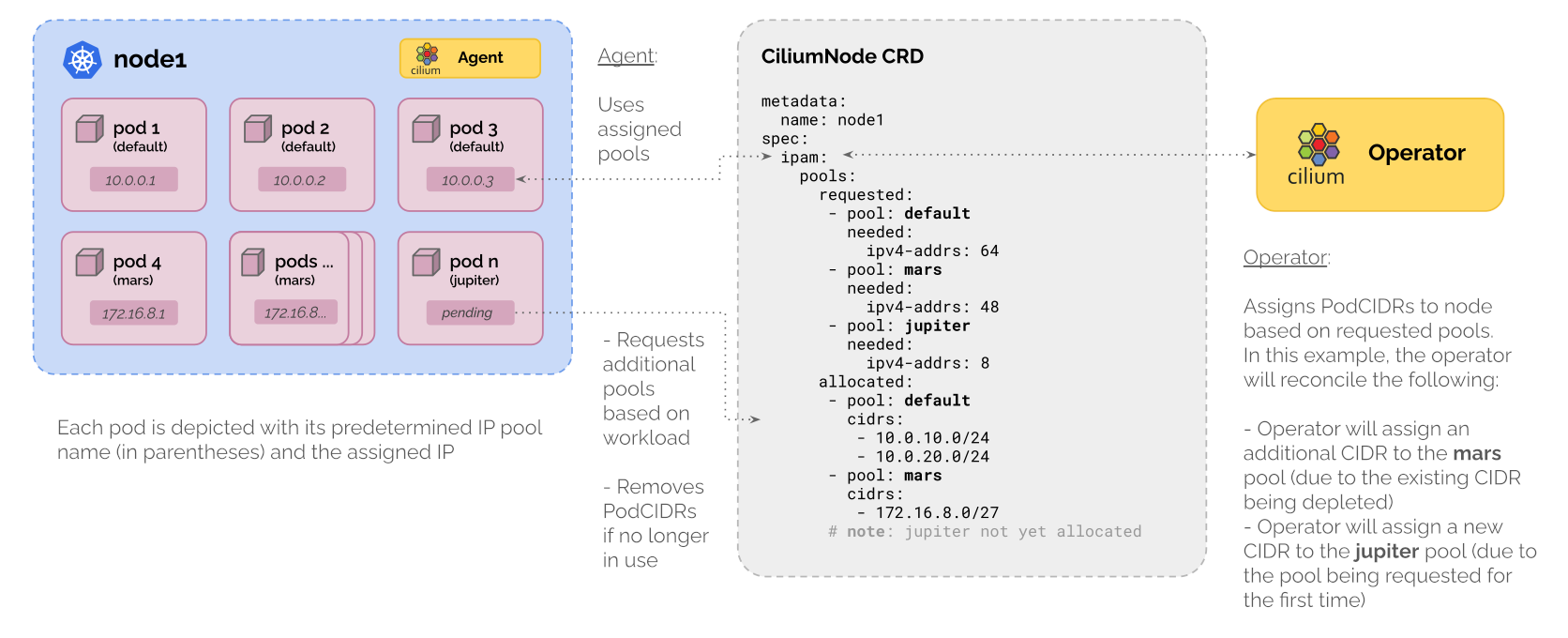
When running in the Multi-Pool IPAM mode, Cilium chooses the pool for a pod in the following precedence order:
You can explicitly name the pool for a pod using the
ipam.cilium.io/ip-pool=<pool-name>annotation, either on the pod or the namespace of the pod. You can specify different pools for IPv4 and IPv6 using theipam.cilium.io/ipv4-pool=<pool-name>andipam.cilium.io/ipv6-pool=<pool-name>annotations.You can define label selectors via
spec.podSelectorand/orspec.namespaceSelectorto specify which pods can get IPs from the pool. If both selectors are defined, both the pod and its namespace must match their respective selectors in order for the pod to be allocated an IP from the pool.In addition to the pod labels, you may also match against these two synthetic labels that Cilium adds for convenience:
io.kubernetes.pod.namespace– the namespace of the pod
io.kubernetes.pod.name– the name of the podIn the case that your pool is not known to Cilium at the time of IP allocation, either due to race conditions or misconfiguration, the pod will be allocated an IP from the default pool. If this is undesired behaviour, you can set the
ipam.cilium.io/require-pool-match="true"annotation on the pod or namespace to block IP allocation until the pod matches a non-default pool.A pod must match exactly one pool for a given IP family. If it matches more than one pool, IP allocation fails and an error is logged. Therefore you must ensure that you do not have overlapping selectors in your pools.
If neither the pod nor the namespace have an explicit IP pool annotation, or if the pod or namespace don’t match any selectors, the pod’s IP will be allocated from the pool named
default.
The annotations are only considered when a pod is created. Changing the ip-pool
annotation on an already running pod has no effect.
The CiliumNode resource is extended with an additional spec.ipam.pools section:
spec.ipam.pools.requestedList of IPAM pool requests for this node. Each entry specifies the pool and the number of requested IP addresses. This field is owned and written to by the Cilium agent running on the particular node. It is read by the Cilium operator to fulfill the requests.
spec.ipam.pools.allocatedList of CIDRs allocated to this node and the pool they were allocated from. Cilium operator adds new PodCIDRs to this field. Cilium agent removes PodCIDRs it has released and is no longer using.
IP pools are managed using the cluster-wide CiliumPodIPPool custom resource.
Each CiliumPodIPPool contains the cluster-wide CIDR from which per-node
PodCIDRs are allocated:
apiVersion: cilium.io/v2alpha1
kind: CiliumPodIPPool
metadata:
  name: green-pool
spec:
  ipv4:
    cidrs:
      - 10.20.0.0/16
      - 10.30.0.0/16
    maskSize: 24
  ipv6:
    cidrs:
      - fd00::/104
    maskSize: 120
New pools can be added at run-time. The list of CIDRs in each pool can also be
extended at run-time. In-use CIDRs must not be removed, and existing pools must not
be deleted if they are still in use by a Cilium node. In case updating an in-use pool
is needed, please follow this procedure in order to
minimize disruption during the update.
The mask size of a pool is immutable and the same for all nodes. Neither restriction
is enforced until GitHub issue 26966 is resolved. The first and last address of a
CiliumPodIPPool are reserved and cannot be allocated. Pools with less than 3
addresses (/31, /32, /127, /128) do not have this limitation.
Configuration
Multi-Pool IPAM can be enabled using the ipam.mode=multi-pool Helm value.
To have the Cilium operator automatically create CiliumPodIPPools custom
resources at startup, use the ipam.operator.autoCreateCiliumPodIPPools Helm
value. It contains a map which follows the CiliumPodIPPools CRD schema
described above.
ipam:
  mode: multi-pool
  operator:
    autoCreateCiliumPodIPPools:
      default:
        ipv4:
          cidrs:
            - 10.10.0.0/16
          maskSize: 24
      other:
        ipv4:
          cidrs:
            - 10.20.0.0/16
          maskSize: 24
Note
For a practical tutorial on how to enable this mode in Cilium, see CRD-Backed by Cilium Multi-Pool IPAM.
Updating existing CiliumPodIPPools
Updating an existing CiliumPodIPPools, is subject to some limitations.
It is possible to extend the pool adding new IPv4 or IPv6 CIDRs, but it is not possible to
delete or update the CIDRs already in use.
This restriction prevents pods from receiving IPs from a new range while some pods still use
the old IP pool on the same nodes. However, if you don’t have other choices than updating in-use CIDRs of an
existing CiliumPodIPPools, use the following steps as a reference.
Let’s assume you have a Kubernetes cluster and are using the multi-pool as the IPAM mode.
The objective is to change the existing default pool CIDR to something else and have pods take the IP addresses from the new CIDR.
To change the CIDR of a pool, you need to re-assign the IPs of existing workloads. To achieve this, you can split the cluster
into two node groups, which allows you to migrate the workloads from nodes using the old CIDR over to nodes using the new CIDR.
In order to clarify the steps below, let’s consider an example kind-based cluster with just two nodes,
kind-worker and kind-control-plane. In this cluster we have a deployment with two replicas (one per node)
running nginx and a single CiliumPodIPPool resource that describes the default pool:
apiVersion: cilium.io/v2alpha1
kind: CiliumPodIPPool
metadata:
  name: default
spec:
  ipv4:
    cidrs:
    - 10.10.0.0/16
    maskSize: 24
To split the cluster, start with picking a subset of the nodes where you would like to update the CIDR first and call them Node Group 1.
The other nodes, which will update the CIDR later than Node Group 1, will be called Node Group 2.
In this example Node Group 1 is composed only of kind-worker, while Node Group 2 includes only the kind-control-plane node:
$ kubectl get pods -o wide
NAME                     READY   STATUS    RESTARTS   AGE   IP            NODE                 NOMINATED NODE   READINESS GATES
nginx-66686b6766-9t4cp   1/1     Running   0          34s   10.10.1.191   kind-worker          <none>           <none>
nginx-66686b6766-jnvrx   1/1     Running   0          34s   10.10.0.77    kind-control-plane   <none>           <none>
Update your existing pool to use a
10.20.0.0/16CIDR instead of the previous10.10.0.0/16.cat <<EOF | kubectl apply -f - apiVersion: cilium.io/v2alpha1 kind: CiliumPodIPPool metadata: name: default spec: ipv4: cidrs: - 10.20.0.0/16 maskSize: 24 EOF
Note how the Cilium operator reports a warning for each CIDR block still in use by node but removed from the pool:
$ kubectl -n kube-system logs deploy/cilium-operator | grep "CIDR from pool still in use by node"
...
time=2025-11-01T11:24:13.076246842Z level=warn msg="CIDR from pool still in use by node" module=operator.operator-controlplane.leader-lifecycle.legacy-cell cidr=10.10.0.0/24 poolName=default node=kind-control-plane
time=2025-11-01T11:24:13.076274725Z level=warn msg="CIDR from pool still in use by node" module=operator.operator-controlplane.leader-lifecycle.legacy-cell cidr=10.10.1.0/24 poolName=default node=kind-worker
...
Restart the Cilium operator.
kubectl -n kube-system rollout restart deploy/cilium-operatorAlternatively, it is possible to update your existing pool through
autoCreateCiliumPodIPPoolsin helm values, then delete the existingCiliumPodIPPoolsand restart the Cilium operator to automatically create the newCiliumPodIPPools.Cordon the Node Group 1 and evict pods from the Node Group 1.
kubectl cordon kind-worker

kubectl drain kind-worker --ignore-daemonsets
The nginx pod running on kind-worker is rescheduled on kind-control-plane with an IP address from the updated pool:
$ kubectl get pods -o wide
NAME                     READY   STATUS    RESTARTS   AGE     IP             NODE                 NOMINATED NODE   READINESS GATES
nginx-66686b6766-2svdm   1/1     Running   0          3m49s   10.20.11.182   kind-control-plane   <none>           <none>
nginx-66686b6766-jnvrx   1/1     Running   0          20m     10.10.0.77     kind-control-plane   <none>           <none>
Delete
CiliumNodesfor Node Group 1, restart the Cilium agents running on Node Group 1 and uncordon Node Group 1.kubectl delete cn kind-worker kubectl -n kube-system delete pod --field-selector spec.nodeName=kind-worker --selector="app.kubernetes.io/name=cilium-agent" kubectl uncordon kind-worker
Cordon the Node Group 2 and evict pods from the Node Group 2.
kubectl cordon kind-control-plane

kubectl drain kind-control-plane --ignore-daemonsets
Both nginx pods running on kind-control-plane are rescheduled on kind-worker with an IP address from the updated pool:
$ kubectl get pods -o wide
NAME                     READY   STATUS    RESTARTS   AGE     IP             NODE                 NOMINATED NODE   READINESS GATES
nginx-66686b6766-2svdm   1/1     Running   0          3m49s   10.20.11.182   kind-control-plane   <none>           <none>
nginx-66686b6766-jnvrx   1/1     Running   0          20m     10.10.0.77     kind-control-plane   <none>           <none>
Delete
CiliumNodesfor Node Group 2, restart the Cilium agents running on Node Group 2 and uncordon Node Group 2.kubectl delete cn kind-control-plane kubectl -n kube-system delete pod --field-selector spec.nodeName=kind-control-plane --selector="app.kubernetes.io/name=cilium-agent" kubectl uncordon kind-control-plane
All the running pods now have IP addresses from the updated pool and new workloads will have IP address from the updated pool as well.
(Optional) Reschedule pods to ensure workload is evenly distributed across nodes in cluster.
Per-Node Default Pool
Cilium can allocate specific IP pools to nodes based on their labels. This feature is particularly useful in multi-datacenter environments where different nodes require IP ranges that align with their respective datacenter’s subnets. For instance, nodes in DC1 might use the range 10.1.0.0/16, while nodes in DC2 might use the range 10.2.0.0/16.
In particular, it is possible to set a per-node default pool by setting the
ipam-default-ip-pool in a CiliumNodeConfig resource on nodes matching
certain node labels.
apiVersion: cilium.io/v2alpha1
kind: CiliumPodIPPool
metadata:
  name: dc1-pool
spec:
  ipv4:
    cidrs:
      - 10.1.0.0/16
    maskSize: 24
apiVersion: cilium.io/v2
kind: CiliumNodeConfig
metadata:
  name: ip-pool-dc1
  namespace: kube-system
spec:
  defaults:
    ipam-default-ip-pool: dc1-pool
  nodeSelector:
    matchLabels:
      topology.kubernetes.io/zone: dc1
apiVersion: cilium.io/v2alpha1
kind: CiliumPodIPPool
metadata:
  name: dc2-pool
spec:
  ipv4:
    cidrs:
      - 10.2.0.0/16
    maskSize: 24
apiVersion: cilium.io/v2
kind: CiliumNodeConfig
metadata:
  name: ip-pool-dc2
  namespace: kube-system
spec:
  defaults:
    ipam-default-ip-pool: dc2-pool
  nodeSelector:
    matchLabels:
      topology.kubernetes.io/zone: dc2
Allocation Parameters
Cilium agent can be configured to pre-allocate IPs from each pool. This behavior
can be controlled using the ipam-multi-pool-pre-allocation flag. It
contains a key-value map of the form <pool-name>=<preAllocIPs> where
preAllocIPs specifies how many IPs are to be pre-allocated to the local
node. The same number of IPs are pre-allocated for each address family. This
means that a pool which contains both IPv4 and IPv6 CIDRs will pre-allocate
preAllocIPs IPv4 addresses and preAllocIPs IPv6 addresses.
The flag defaults to default=8, which means it will pre-allocate 8 IPs from
the default pool. All other pools which do not have an entry in the
ipam-multi-pool-pre-allocation map are assumed to have a preAllocIPs of
zero, i.e. no IPs are pre-allocated for that pool.
Depending on the number of in-use IPs and the number of pending IP allocation
requests, Cilium agent might pre-allocate more than preAllocIPs IPs. The
formula Cilium agent uses to compute the absolute number of needed IPs from each
pool is:
neededIPs = roundUp(inUseIPs + pendingIPs + preAllocIPs, preAllocIPs)
Where inUseIPs is the number of IPs that are currently in use,
pendingIPs number of IPs that have a pending pod (i.e. pods which have been
scheduled on the node, but not yet received an IP), and preAllocIPs is the
minimum number of IPs that we want to pre-allocate as a buffer, i.e. the value
taken from the ipam-multi-pool-pre-allocation map.
Routing to Allocated PodCIDRs
PodCIDRs allocated from CiliumPodIPPools can be announced to the network by the
Cilium BGP Control Plane (MultiPool IPAM). Alternatively,
the autoDirectNodeRoutes Helm option can be used to enable automatic routing
between nodes on a L2 network.
Masquerade Behaviour
When combining multi-pool IPAM and BGP control plane, you may find it useful to not masquerade connections from such pools. As Pod IPs are advertised via BGP to your underlay network and return traffic can find its way back, it may not be desirable for the pod source IP to be masqueraded as the IP of the node it is on.
It is not always possible to identify pods that should not be masqueraded with just destination
IPs (via --ipvX-native-routing-cidr flag or ip-masq-agent rules) as there might be overlap
between masqueraded and non-masqueraded pod destination IPs. In such cases, you can exclude IP
pools from masquerading when eBPF-based masquerading is enabled, by using the flag
--only-masquerade-default-pool which disables masquerading for all non-default pools.
Alternatively, you may configure this on a per-pool basis by annotating the CiliumPodIPPool
resource with ipam.cilium.io/skip-masquerade="true".
Using the flag or the annotation results in the source IP of your pods being preserved when they connect to endpoints outside the cluster, allowing them to be differentiated from pods in other pools on your underlay network. The pods can then match firewall or NAT rules on your network infrastructure.
Changing either the flag or the annotation after a pod has been allocated an IP will not change masquerade behaviour for that pod until it has re-scheduled.
Limitations
The following limitations apply to Cilium running in Multi-Pool IPAM mode:
Warning
IPAM pools with overlapping CIDRs are not supported. Each pod IP must be unique in the cluster due the way Cilium determines the security identity of endpoints by way of the IPCache.
iptables-based masquerading requires
egressMasqueradeInterfacesto be set (see masquerading Implementation Modes and GitHub issue 22273 for details). Alternatively, eBPF-based masquerading is fully supported and may be used instead. Note that if the used IPAM pools do not belong to a common native-routing CIDR, you may want to useip-masq-agent, which allows multiple disjunct non-masquerading CIDRs to be defined. See Masquerading for details on how to use theip-masq-agentfeature.